A community-driven font project for creators, letterers and doodlers.
Draw your letters by hand, turn them into a real font, and share it with everyone. Free to make, free to use, and built by people like you.
Great for comics, magazines, school projects, web pages and more.
Welcome, and thanks for stopping by! Grab a pen, have some fun, and make a font that’s all yours.
Make a font from your own drawings
A free community project by Saboteur Publishing Group. Draw your letters on our template, scan them, and turn them into a font you can use anywhere. Fonts made here go into a shared library under the Creative Commons CC0 1.0, so everyone can use them.
What you need
- A printer and US Letter or A4 paper
- Print the sheet in color so our futuristic compute machine over here can see your amazing font family.
- A black pen or marker. Pencil and light colors won’t be detected.
- A scanner, or a phone camera set to JPG
How it works
- Print the template.
- Draw your letters and scan or photograph the pages.
- Check your letters and their spacing.
- Make Bold and Italic if you want them, then finish and download.
Good to know
- The faint letters are only a guide. You don’t have to follow them perfectly. Whatever you draw in a box becomes that character.
- You can skip pages. Your font will just be missing those characters.
- Your scans stay on your device.
- At the end you choose: share it free in the library, or keep it private for $2.99.
- You can add Bold or Italic later. They go on the same font.
Let’s get started
Print the template
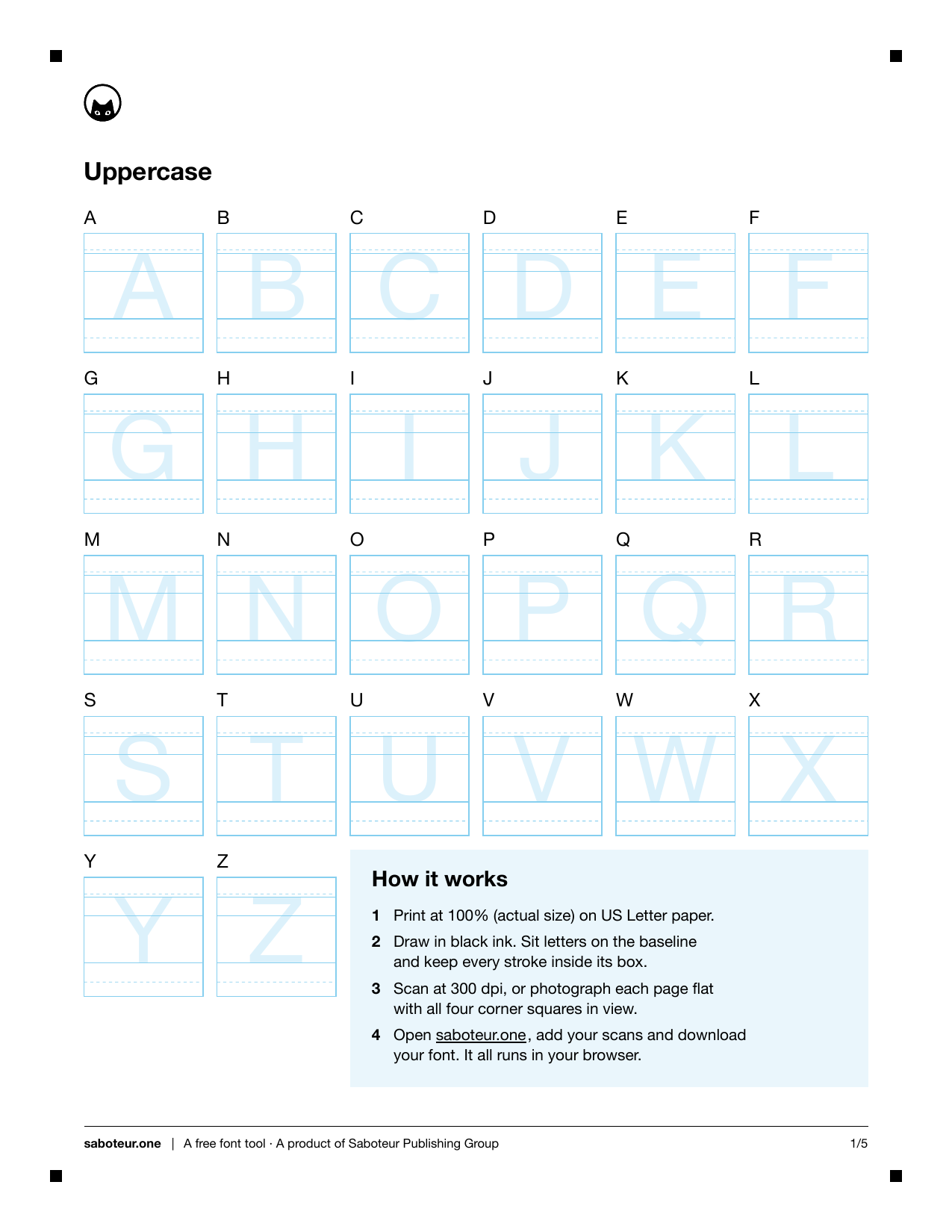
Download the 5-page template, print it and draw your letters. You’ll name your font at the end.
Print it in color for best results.
Your font can come in three styles
- RegularYou draw this
- Your everyday letters: upright, at the thickness you draw them. This is what you put on the template.
- BoldCrafted and fine-tuned by you
- The same letters with thicker strokes, for headlines and emphasis.
- ItalicCrafted and fine-tuned by you
- The same letters leaning to the right.
You fine-tune Bold and Italic from your Regular scans in step 4. You don’t draw them.
How it works
- Print at 100% (actual size) on US Letter paper. On A4 or another euro size? No passport needed. Just pick Fit to page so the whole sheet fits your printer.
- Use a black pen or marker. Don’t use pencil or light colors. The app won’t be able to detect them. Sit letters on the baseline and keep every stroke inside its box.
- Scan or photograph the whole page, flat at 100 to 300 dpi (300 is best), facing up, with the arrow at the top. Keep all four black corner marks in the scan so the computer can read the page.
- Open saboteur.supply, add your scans and download your font. It all runs in your browser.
Add your scans
Add the pages you drew, as JPG or PNG. You can skip pages; their characters will be missing from your font. Your scans stay on your device.
Your work saves in this browser as you go. It’s lost only if you clear your browser data or use a private window.
Get all four black corner squares in your scan
Every template page has a small black square in each corner. The computer uses them to find your page and line up your letters.
If even one square is cut off, the page can’t be read. Scan or photograph the whole sheet, edge to edge.
Made a mistake on a letter? Fix it before you scan. Cover it with white-out or a scrap of white paper, then write it again.
Drop scans or photos here
Use at least 100 dpi, or up to 300 dpi for that fine quality. Lower may give a poor-quality font.
Tip: Name your files 1 to 5, in page order, so they stay in order when you upload them all at once.
Taking photos with a phone
Photos must be JPG or PNG. HEIC photos can't be read.
iPhone
- Open Settings, then Camera, then Formats.
- Choose Most Compatible.
- Take the photos after changing the setting. Photos taken before stay HEIC.
Android
- Most Android cameras save JPG already.
- On Samsung, open Camera settings, then Picture formats, and turn off High efficiency pictures.
Every phone
- Lay the page flat in even light, with no shadow across it.
- Hold the phone straight above the page.
Check your letters
Select a character to compare the scan with its outline and adjust its spacing. Whatever you drew in a box becomes that character, even if it doesn’t look like the guide letter.
Your work saves in this browser as you go. It’s lost only if you clear your browser data or use a private window.
It’s OK if you don’t add all the characters, but it sure is nice.
You need at least 28 drawn characters to finish.
Shows your current tracking and kerning. Adjust tracking and kerning
Test and download
Type below to try the font, then download it.
Your work saves in this browser as you go. It’s lost only if you clear your browser data or use a private window.
Super fine tune
Bold and Italic are made from your scanned Regular letters. Set the weight and slant, then save each style.
Tracking adds or removes the same space between every pair of letters. Per-letter spacing is in step 3.
Advanced: kerning
Kerning adjusts the space between specific pairs, like A and V. Negative values pull a pair closer.
Your family
| Style | Status | Characters | Desktop apps | Websites |
|---|---|---|---|---|
| Regular | Not made yet | — | Add your scans | |
| Bold | Not made yet | — | ||
| Italic | Not made yet | — | ||
Downloads unlock when you finish.
Your font is saved to your page. Go to my page
How to install your font
Download the TTF for apps on your computer. The WOFF2 is for websites.
- Mac
Open the downloaded .ttf file, then click Install Font in Font Book. - Windows
Right-click the .ttf file and choose Install, or Install for all users. On Windows 11 you may need Show more options first. - Websites
Use the .woff2 file with @font-face in your CSS. - Then
Restart any app that was already open so it finds the new font.
Feedback
Help us make it better
saboteur.supply is a community project, and it gets better with your ideas. Send us a suggestion, tell us what’s broken, or share what you’d love to see next.
Thanks, we got it!
We read every message. If you left an email, we’ll get back to you.
Community rules
saboteur.supply is free and open to everyone. Play nice so it stays that way.
Play nice
- Be kind to other creators.
- No bullying, hate or harassment, in a font name, bio, link, photo or drawn as letters.
- No hate symbols.
Draw your own letters
- Only add letters you drew yourself.
- No traced fonts, and no one else’s handwriting without their OK.
- Credit only the person who made the font.
Keep it clean
- No swear words, adult content or adult-site links in a font name, credit, bio or link.
- No rude or sexual images, in a profile photo or drawn as letters.
- No one else’s private details, such as an address or phone number.
No spam
- No ads or sales pitches in bios or links.
- No fake creator pages, and don’t pretend to be someone else.
- Don’t add the same font over and over.
If something breaks the rules
- Use the Report link on any font.
- We may hide a font, remove a photo or lock a creator page that breaks these rules.
- The full legal version is in the Terms of use.
Terms of use
These terms cover saboteur.supply, a free community font tool from Saboteur Publishing Group. By making a font here, you agree to them.
The short version
- Making a font is free.
- When you finish a public font, it joins the community library under the Creative Commons CC0 1.0. Anyone can download it, use it, change it and share it, including for commercial work.
- Your name is shown with your font in the library.
- Once a public font has been downloaded, the license can’t be taken back.
- Want to keep a font to yourself? Make it private for $2.99. It stays on your creator page, and you should download your own copy.
- Your scans stay on your device.
What anyone can do with a library font
- Use it for anything: comics, posters, websites, apps, products, personal or commercial work.
- Install it, embed it in documents and software, and share copies.
- Change it and make new versions.
- No credit needed.
Bought a private font instead? It’s yours to keep. It stays on your creator page, and you should download your own copy. More on private fonts
What you keep
- This is community driven. There’s no copyright to hold on to: once your font is public, everyone can use, share and change it under the license. It isn’t owned by us or anyone else.
- Your name, and your link if you add one, are saved inside the font file and shown in the library.
- You can ask us to remove your font from the library at any time. People who already downloaded it can keep using it under the license.
Private fonts
If you choose “Keep private, $2.99”, the font costs $2.99. You need a creator page for it. Your private font isn’t listed in the library or shared with anyone, and it isn’t licensed to the community. You keep all rights. It’s kept on your creator page and only you can download it. Download it and save your own copy when you buy it: we aren’t responsible for lost fonts.
What you can’t add
- Scans that aren’t on our template. You need to use our template only.
- Letters you didn’t draw yourself, such as a traced font or someone else’s handwriting.
- Swear words, adult content or adult-site links in a font name, credit, bio or link.
- Rude or sexual images, in a profile photo or drawn as letters.
We can remove anything that breaks these rules, and lock the creator page that posted it.
Creator pages
A creator page is optional, except for private fonts. You sign in with your email and a password, and pick a public page name for your page. Keep your password safe. If you forget it, we can email you a reset link.
Privacy
See Privacy for what we store.
Reports and removal
Every library font has a Report link. We review reports and may hide or remove a font while we look at it.
You’re responsible for your own stuff
This is a free community tool, given as it is. When you use it, you’re the one in charge of your fonts, files and passwords. We aren’t responsible for:
- Lost passwords or recovery emails.
- Fonts you can’t find, didn’t download or didn’t save.
- Unfinished projects lost when your browser or device clears its data.
- Private fonts you didn’t download.
- How other people use fonts from the library.
- The tool being down, slow, changed or switched off.
Download your fonts as soon as you finish and keep your own copies. As far as the law allows, we aren’t liable for any loss that comes from using the tool.
Changes to these terms
We may update these terms. Fonts already in the library stay under the license they were published with.
Privacy
- Your scans are processed in your browser and are never uploaded.
- Private fonts are kept on our server, on your creator page, so you can download them again. Only you can download them.
- For public fonts we store the finished font (WOFF2), its name and category, and your credit, bio, link and photo if you add them.
- Your creator page needs an email. We use it only to sign you in and send password reset links. It’s stored encrypted, and it’s never shown publicly or shared.
- If you buy a private font, we email you once at the address you give at checkout to tell you it’s ready. We don’t keep that address.
- Your password is stored only in a scrambled form we can’t read back.
- Payments are handled by Stripe. We never see your card details.
- If you send us a message or a report, we keep the name and email you give so we can answer.
Report a font
Every library font has a Report link. We review reports and may hide or remove a font while we look at it.
Thanks, we got it!
We review reports and may hide or remove a font while we look at it.
The people behind the fonts
Everyone who has shared a font in the library. Open a page to see all of their fonts.
Takedown, textures, and handwriting
Takedown
If you believe a font or texture on saboteur.supply uses your work without permission, use Report a font and say what is yours. We review reports. We may hide the item while we look. Hiding keeps the files, so the item can be put back. We email you only if you left an address.
Textures
Public texture packs on saboteur.supply are CC0 1.0. You can use them, change them, and share them, including for paid work. No credit is required.
Upload
Before a font is submitted, the person must confirm: this is my handwriting.
Textures
High-resolution scanned textures for illustrators and designers: paper, screentone, newsprint, gel plate, paint and more. These textures are free. Lay them over artwork as overlays, use them as backgrounds or masks, add grain to type and photos, or cut them into collage and comic pages.
Admin
Loading…
Reports
No reports yet.
| Font | Reason | Details | Reported | Actions |
|---|
Takedown log
Public fonts
Hide takes a font off the library and creator pages; its files stay, so you can show it again. Remove deletes it from the library and deletes its files. Remove can’t be undone.
| Font | Creator | Downloads | Status | Actions |
|---|
Look up an account
Sign in
Use your email and password.
Register
Your email and a password sign you in. Your email is never shown. Pick a page name for your public page. You can also register when you finish your first font.
Reset your password
You opened this from the reset link we emailed you. The link works once. Your old password stops working when you save a new one.
Edit your page
Your photo, name, bio and link show on your creator page. Your email is never shown.
Your private fonts
Only you can see these.
Every font here is free to download and use under the Creative Commons CC0 1.0. Type below to preview them all.
This is an ever-growing community project. Please contribute, and come back to see what others are creating.
The license
Every font in this library is licensed under the Creative Commons CC0 1.0.
- Use it for anything, including commercial work.
- Share it and change it.
- No credit needed.
How to install your font
Download the TTF for apps on your computer. The WOFF2 is for websites.
- Mac
Open the downloaded .ttf file, then click Install Font in Font Book. - Windows
Right-click the .ttf file and choose Install, or Install for all users. On Windows 11 you may need Show more options first. - Websites
Use the .woff2 file with @font-face in your CSS. - Then
Restart any app that was already open so it finds the new font.